
 Solution Centre
 Service Hotline 400-889-8282
News
23 Sep
Maintenance │ Maintenance of Japanese “Brother” Machining Centers Before and After Long Holidays
Proper maintenance of equipment before and after a long holiday is essential. Before production is suspended for an extended period, special attention should be paid to machine tool maintenance and parameter backup to prevent the equipment from failing to start properly after the holiday and affecting normal production.
Here are some basic maintenance procedures for Brother machine tools before a long holiday, which we hope will be helpful.
A. Precautions for Customers Using Brother Machine Tools During Extended Shutdowns
- Thoroughly clean the interior and exterior of the machine enclosure, as well as any chips inside the X-, Y- and Z-axis covers. Wipe away any cutting fluid to prevent moisture from causing rust on the covers. At the same time, clean any dirt and debris from all cooling fans.
- If the machine uses a manual lubrication system, refer to the specification label on the rear door of the electrical cabinet and use the specified type of grease to lubricate each axis. Then move each axis through its full travel range to distribute the grease evenly over the surfaces of the ball screws and guideways. After completing lubrication, position the X, Y and Z axes at the center of the machine. This prevents uneven loading caused by leaving the worktable at another position for an extended period.
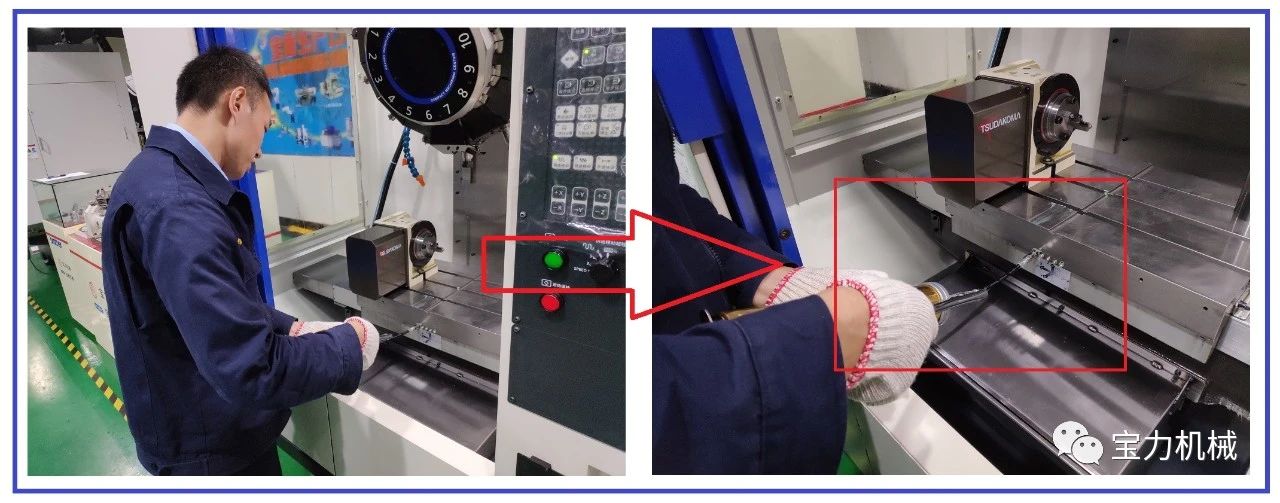
▲ Manual Lubrication
- Do not leave a tool holder installed in the spindle. If cutting fluid remains on the contact taper surfaces of the spindle and tool holder, the two taper surfaces may adhere to each other. Remove the tool holder and clean the spindle taper. Apply anti-rust oil evenly to both the tool holder taper and spindle taper.
- The worktable and fixture surfaces are susceptible to rust. Apply anti-rust oil and lubricating grease to these surfaces.
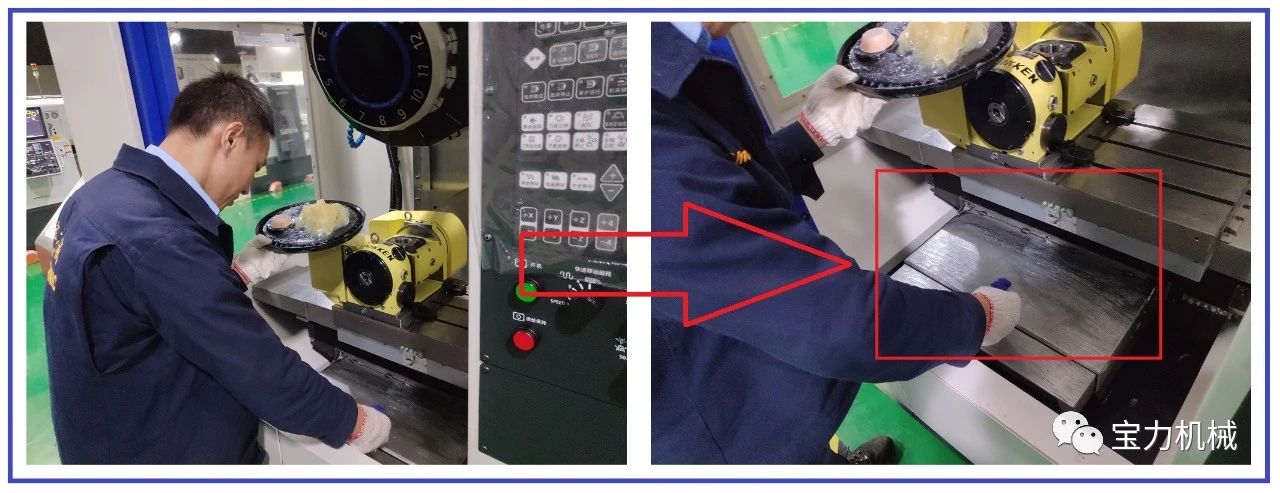
▲ Applying Anti-Rust Oil and Lubricating Grease to the Worktable Surface
- Check whether a battery icon is displayed on the screen. If a battery icon is displayed, replace the battery as soon as possible. Failure to replace the battery in time may result in the loss of machining programs, machine parameters and other data when the machine is restarted after a prolonged power outage. When replacing the battery, make sure it is inserted in the correct direction and that the connection is secure. For machines that have been in service for more than one year, the battery must be replaced before every annual long holiday.
Replace the battery while the machine is powered on to prevent the loss of stored data caused by power interruption.
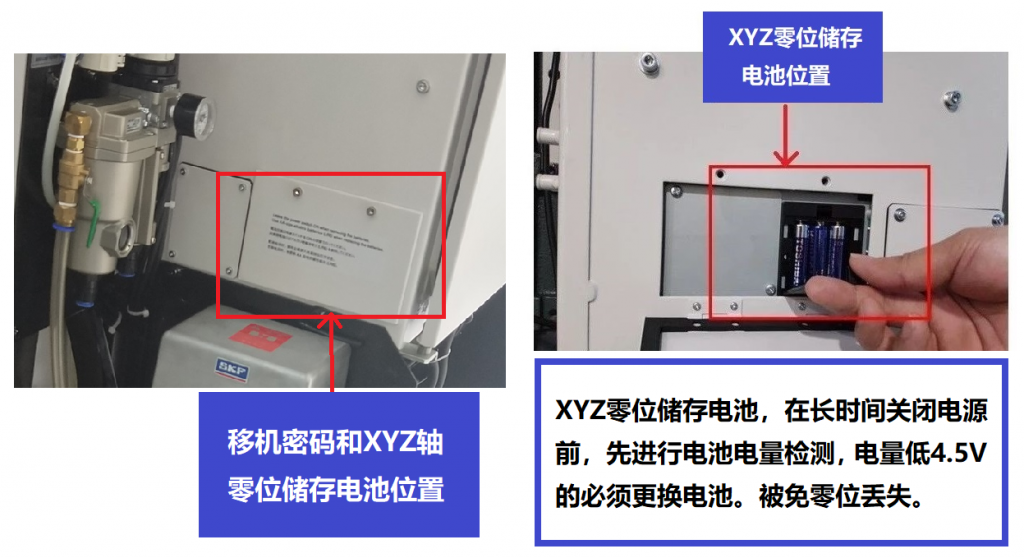
▲ Battery Replacement Location (XYZ Zero-Position Storage Battery)
.png)
▲ Battery Replacement Location (Machine Relocation Inspection Device Storage Battery)
- If you are concerned about losing machining programs, machine parameters or other data, back up the required data and save it to a computer or USB flash drive.
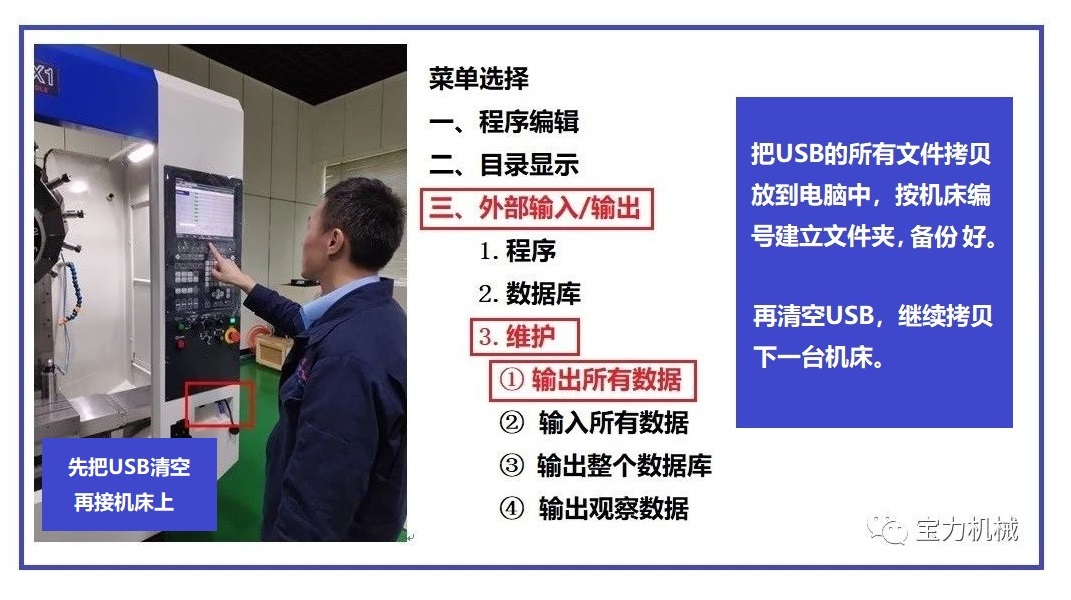
▲ The data backup procedure is the same as the B00 and C00 system backup procedures shown above.
D00 Machine Parameter Backup Procedure — Refer to the Video for the Steps
|
|
- After removing chips from the coolant tank, consider the appropriate method for storing the coolant. Drain all coolant and check its concentration and pH value. After completing machine cleaning, return the Z-axis to the machine zero point and move the X- and Y-axes to the middle of their travel range (e.g. X-250/-350, Y-200).
- For machine models equipped with an air-blow function for the spindle taper, close the machine's main air valve after cleaning the machining area.
For M140 and M200–M300 series machines, cleaning and maintenance must be completed one hour after machining before the main air supply can be shut off.
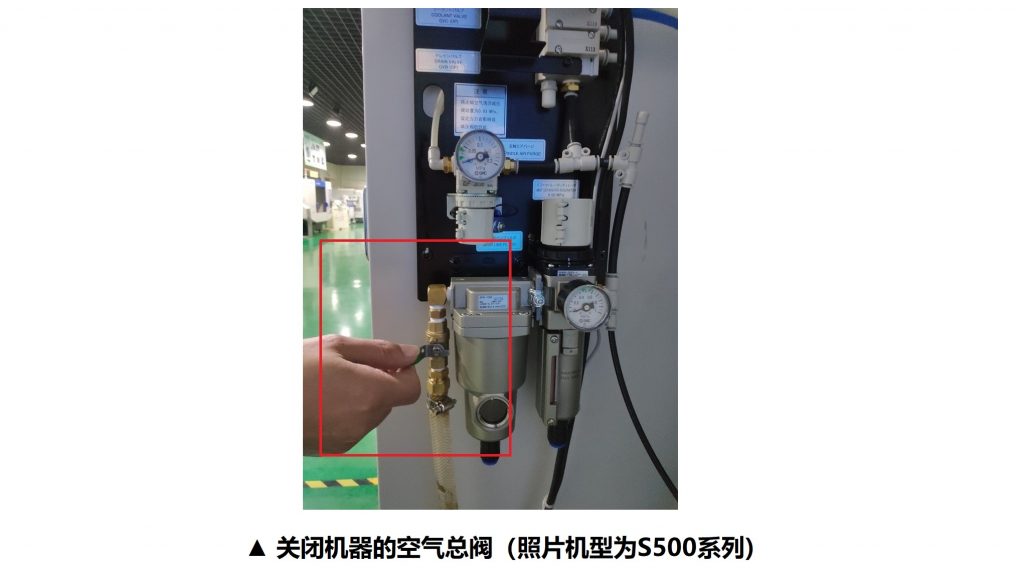
▲ Closing the Machine's Main Air Valve (S500 Series Shown)
- Brother machine models are also equipped with a constant-pressure air-blow function inside the automatic tool changer mechanism. This function prevents the rotating components from sticking after cutting fluid dries. After cleaning the machining area, close the machine's main air valve.
- Drain any accumulated water from the moisture separator installed on the machine before closing the main air valve.
B. Items to Check When Restarting the Machine After a Long-Term Shutdown
- First, use manual mode to move each axis slowly. After confirming that everything is operating normally, switch to automatic mode and move each axis through its full travel range at low speed for at least 15 minutes.
- Perform spindle break-in. Start at 100 rpm and gradually increase the speed to the maximum rpm. Then gradually reduce the speed back to 100 rpm. The entire break-in operation should be performed for at least 15 minutes.
- Check that all cooling and exhaust fans installed on the spindle motor, inside and outside the control cabinet, and on the regenerative resistor box mounted on the control cabinet are operating normally.
- Circulate the coolant through the machine and check the coolant tank, including the concentration, pH value and whether the coolant has deteriorated.
• For machines used to process magnesium alloys, pay particular attention to the coolant. Consult the manufacturer regarding the use of specialized coolant designed to prevent magnesium crystallization and ensure that the water quality meets the required specifications.
- Confirm that the machine leveling meets the required specifications. If conditions permit, verify that the machine's accuracy requirements are within specification. When machining the first workpiece, move the axes slowly to verify coordinate positioning.
- Check that the tool-clamping pins on both sides of each tool gripper are moving properly and ensure that there is no sticking or excessive wear. Then correctly install the required tools into the tool magazine.
- Check the machining program, tool data and workpiece zero point to ensure that all settings are correct. After debugging the first workpiece in single-block mode at low speed, proceed with fully automatic operation.
Professional Service from the Pro-Technic Engineering Team
“Pro-Technic Machinery Group” has nearly half a century of experience in the machinery and equipment industry and has established a strong reputation through its technical expertise and service capabilities. Our professional technical service team provides customers with comprehensive technical support, as well as professional pre-sales and after-sales services.
For enquiries or technical support, please contact us. We look forward to hearing from you.
Email: main@protechnic.com.hk
National Service Hotline: 400-889-8282
After-Sales Service Hotline:
852-2424 2728
0769-8538 9897
 Back to News Index